AI Coding Assistants ने डेवलपर्स के काम करने के तरीके को पूरी तरह बदल दिया है। अब कोड लिखना, डिबग करना और नया प्रोजेक्ट बनाना आसान हो गया है। ये टूल्स AI की मदद से आपके कोडिंग प्रोसेस को तेज़, स्मार्ट और त्रुटि-रहित बनाते हैं।
इस पोस्ट में हम देखेंगे 5 टॉप AI Coding Assistants, उनके फीचर्स, फायदे और तुलना तालिका — ताकि आप जान सकें कौन सा टूल आपके लिए सबसे उपयुक्त है।
🔎 1️⃣ GitHub Copilot
फीचर्स:
- AI-assisted code suggestions
- Multi-language support (Python, JavaScript, TypeScript, Go आदि)
- Context-aware code completion
- VS Code और JetBrains IDEs में इंटीग्रेशन
फायदे:
- तेज़ कोड लिखने में मदद करता है
- डेवलपर की productivity बढ़ाता है
- नए डेवलपर्स के लिए सीखने में आसान
🔎 2️⃣ Tabnine
फीचर्स:
- AI-powered code completion
- Supports 30+ programming languages
- Cloud and Local AI models
- Real-time code predictions
फायदे:
- टाइपिंग की स्पीड बढ़ाता है
- एरर-फ्री कोड लिखने में मदद
- टीम प्रोजेक्ट्स के लिए आदर्श
🔎 3️⃣ Amazon CodeWhisperer
फीचर्स:
- Secure code suggestions
- Integrated with AWS ecosystem
- Supports Java, Python, JavaScript
- Detects security vulnerabilities
फायदे:
- Cloud-based deployment के लिए बेहतरीन
- Security और compliance पर ध्यान
- Production-ready कोड के लिए उपयुक्त
🔎 4️⃣ Replit Ghostwriter
फीचर्स:
- Real-time AI code suggestions
- In-browser IDE support
- Multi-language code assistance
- Collaborative coding features
फायदे:
- तुरंत कोड सुझाव
- Browser-based coding
- Remote collaboration आसान बनाता है
🔎 5️⃣ Codeium
फीचर्स:
- Free AI-powered coding assistant
- Multi-language code completion
- IDE plugins (VS Code, JetBrains)
- Lightweight and fast
फायदे:
- फ्री विकल्प के रूप में बेहतरीन
- छोटे और बड़े प्रोजेक्ट दोनों के लिए उपयुक्त
- Beginners के लिए आसान
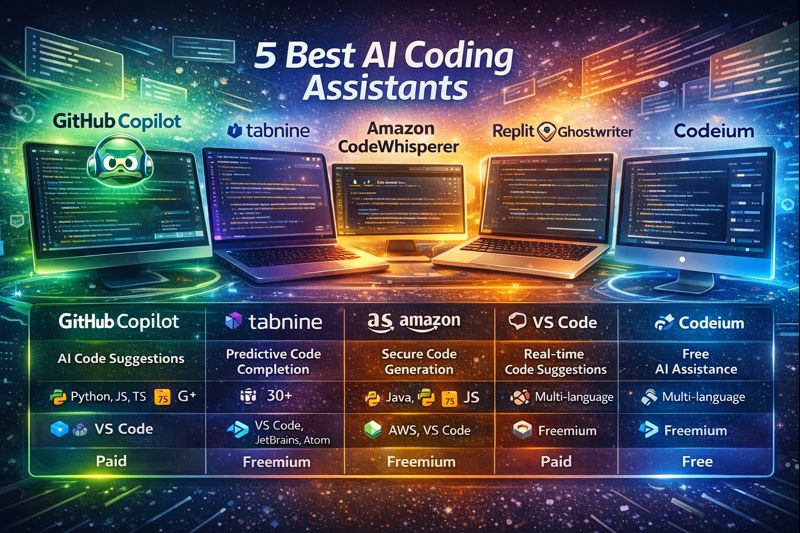
📊 तुलना तालिका: 5 Best AI Coding Assistants
| Tool | Main Feature | Supported Languages | IDE Integration | Free / Paid | Best For |
|---|---|---|---|---|---|
| GitHub Copilot | AI Code Suggestions | Python, JS, TS, Go, C# आदि | VS Code, JetBrains | Paid | Productivity & Learning |
| Tabnine | Predictive Code Completion | 30+ Languages | VS Code, JetBrains, Atom | Freemium | Speed & Team Collaboration |
| Amazon CodeWhisperer | Secure Code Generation | Java, Python, JS | AWS IDE, VS Code | Freemium | Cloud & Security |
| Replit Ghostwriter | Real-time Code Suggestions | Multi-language | Replit Browser IDE | Paid | Browser Coding & Collaboration |
| Codeium | Free AI Assistance | Multi-language | VS Code, JetBrains | Free | Beginners & Lightweight Projects |
📝 AI Coding Assistants का चुनाव कैसे करें?
- उद्देश्य तय करें:
- Productivity और learning → GitHub Copilot
- Security & Cloud Integration → Amazon CodeWhisperer
- Team Collaboration → Tabnine या Replit Ghostwriter
- Language Support देखें:
सुनिश्चित करें कि आपका प्रोजेक्ट जिस भाषा में है, टूल उसे सपोर्ट करता हो। - IDE Integration:
अपने काम करने वाले IDE के अनुसार टूल चुनें। - Price & Budget:
- Free विकल्प → Codeium
- Paid विकल्प → Copilot, Replit Ghostwriter
✅ निष्कर्ष
AI Coding Assistants ने कोडिंग के तरीके को बदल दिया है। ये टूल्स न केवल कोड लिखने की स्पीड बढ़ाते हैं, बल्कि एरर कम करते हैं, सिक्योरिटी सुनिश्चित करते हैं, और डेवलपर्स को बेहतर प्रोजेक्ट आउटपुट देने में मदद करते हैं।
- Beginners → Codeium, GitHub Copilot
- Cloud & Security → Amazon CodeWhisperer
- Collaboration → Tabnine, Replit Ghostwriter
AI Coding Assistants आज के डेवलपर के लिए ज़रूरी टूल बन चुके हैं, और आने वाले समय में इनकी उपयोगिता और बढ़ती जाएगी।
🏷 Hashtags
#AICodingAssistant, #GitHubCopilot, #TabnineAI, #AmazonCodeWhisperer, #ReplitGhostwriter, #Codeium, #BestCodingTools, #AIForDevelopers, #ProgrammingProductivity, #CodeAutomation, #MultiLanguageCoding, #SecureCoding, #AIInDevelopment, #2026Tech, #AIProgramming